5.4 Configuring Generic KASAN Mode
Since we decided to start with Generic KASAN, we first need to "arm" the kernel.
The configuration process itself isn't complicated, but it's like swapping an engine in a race car—even though you're just tightening a few screws, you know that once they're in place, the machine's entire operational logic changes.
Enabling Generic KASAN
The first step is routine: open the kernel configuration menu.
If you are configuring for ARM64 (our default architecture for this demo), the command is:
make ARCH=arm64 menuconfigIn the menu, navigate the following path to find the KASAN toggle: Kernel hacking → Memory Debugging → KASAN: runtime memory debugger
After entering this submenu, you will see the mode selection options. Here we keep the default, which is Generic KASAN mode.
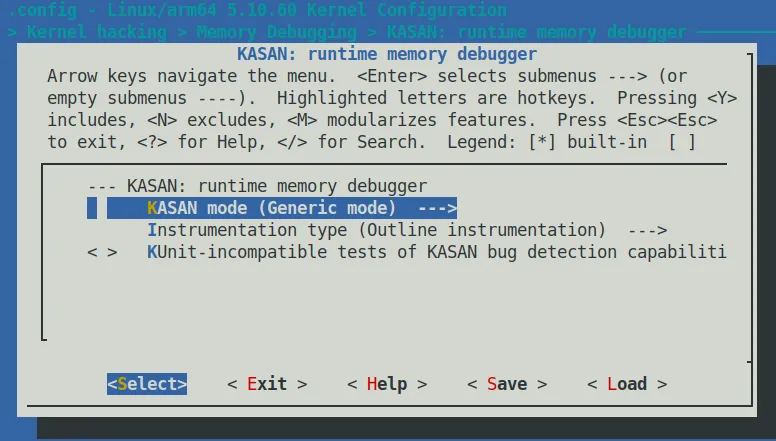 Figure 5.1 – Kernel configuration screenshot for enabling KASAN
When you highlight the Config KASAN as generic mode option and press the < Help > key, a prompt will pop up that is worth spending 10 seconds to read. This isn't just a description—it's telling you the "price":
This mode consumes about 1/8th of available memory at kernel start and introduces an overhead of ~x1.5 for the rest of the allocations. The performance slowdown is ~x3.
In plain English:
- Memory: At kernel boot, it will immediately consume 1/8 of your physical memory. If your board only has 512MB of RAM, this cut will hurt.
- Allocation Overhead: The overhead for all memory allocations will increase by about 1.5x.
- Overall Performance: System execution speed will slow down by roughly 3x.
This is the down payment you make to catch those ghost-like bugs.
After saving the configuration and exiting, we can see exactly what changed in the .config file.
For the ARM64 architecture, a specific set of macros will appear in .config (note the presence of SHADOW_OFFSET and SW_TAGS):
$ grep KASAN .config
CONFIG_KASAN_SHADOW_OFFSET=0xdfffffd000000000
CONFIG_HAVE_ARCH_KASAN=y
CONFIG_HAVE_ARCH_KASAN_SW_TAGS=y
CONFIG_CC_HAS_KASAN_GENERIC=y
CONFIG_KASAN=y
CONFIG_KASAN_GENERIC=y
[...]There is a key piece of information here: CONFIG_KASAN_SHADOW_OFFSET. This is the base address (Kernel Virtual Address) of the "shadow memory" we mentioned earlier. The kernel relies on this value to map your actual memory addresses to this dedicated shadow region, thereby recording the state of each memory segment (whether it is readable, freed, etc.).
KASAN's Impact on the Compilation Process
Simply enabling CONFIG_KASAN=y isn't enough; the compiler's behavior also undergoes a fundamental change.
If you recompile the kernel with the V=1 parameter (make V=1), you will see a flurry of GCC parameters flying across the screen. If we capture a snippet, you will see a compilation command like this:
make V=1

gcc -Wp,-MMD,[...] -fsanitize=kernel-address \
-fasan-shadow-offset=0xdffffc0000000000 --param \
asan-globals=1 --param asan-instrumentation-with-call-threshold=0 \
--param asan-stack=1 --param asan-instrument-allocas=1 [...]Pay attention to these key parameters:
-fsanitize=kernel-address: This is the master switch for compiler instrumentation. It tells GCC: "In this compilation unit, I want to check all memory accesses."-fasan-shadow-offset=...: Tells the compiler the starting offset of the shadow memory, so the generated check code can calculate the correct shadow address.
The essence of how KASAN works is: every time you read or write memory, it intervenes.
This uses a technique called Compile-Time Instrumentation. Simply put, during the compilation phase, the compiler secretly inserts some "check code" into your code.
Whenever you have a line of code that attempts to read 1, 2, 4, 8, or 16 bytes of memory, the compiler actually generates logic similar to this:
- Call the
__asan_load*()function (Outline mode) - Or directly insert a block of check logic (Inline mode)
By checking the value in the corresponding "shadow memory," the runtime can determine: is this access legitimate, or are we "reading/writing out of bounds"?
Outline vs. Inline: Two Schools of Instrumentation
Since we mentioned instrumentation, there is an important configuration option worth your attention that determines the "depth" of the compiler's intervention.
In the configuration menu, you will see the Instrumentation type option. It corresponds to two kernel configuration macros:
CONFIG_KASAN_OUTLINE(default): Outline instrumentation.- The compiler inserts actual function calls (such as
__asan_load1). - Pros: The resulting kernel image size is smaller (there is only one copy of the check code).
- Cons: Every access must go through the function call process, resulting in relatively higher performance overhead.
- The compiler inserts actual function calls (such as
CONFIG_KASAN_INLINE: Inline instrumentation.- The compiler directly hard-copies the check logic code to every single memory access point.
- Pros: Faster speed (saves the overhead of function calls), typically 1.1x to 2x faster than Outline.
- Cons: The kernel image size will balloon significantly (because the check code is copied countless times).
This is a classic engineering trade-off. For kernel debugging, the default Outline mode is usually sufficient; but if you find KASAN too slow and it affects the reproduction of certain timing-related bugs, switching to Inline mode might bring a pleasant surprise.
Auxiliary Configuration: Making Reports More Readable
When KASAN catches a bug, it throws a report. To make this report more valuable—not just telling you "it crashed," but telling you "who did it"—we recommend enabling the following two options while you're at it.
1. Enable Stack Traces
Make sure to enable CONFIG_STACKTRACE.
This makes KASAN print not only the current access stack when reporting an error, but also "when this memory was allocated" and "when it was freed." This is crucial for locating Use-After-Free (use-after-free) issues.
2. Track Page Owners
Under the Kernel hacking → Memory Debugging menu, find and enable Track page owner (corresponding to CONFIG_PAGE_OWNER).
This isn't just for KASAN; it's a general kernel memory debugging feature that records the allocation and free history stack of every physical page.
⚠️ Warningpage_owner is off by default. Even if you compile it in, you need to add page_owner=on to the kernel boot parameters for it to actually take effect.
A Special Option on x86_64: vmalloc Space
If you are configuring on the x86_64 architecture, you will find an extra option that is usually not present on ARM64:
[*] Back mappings in vmalloc space with real shadow memoryThe purpose of this option is to map the vmalloc space with real shadow memory.
With this enabled, KASAN can detect vmalloc-related memory corruption issues (such as out-of-bounds writes into vmalloc-allocated areas). The cost, naturally, is a further increase in runtime memory usage. If you are debugging driver modules (which are frequently loaded into vmalloc space), this option is very useful.
Ready for Ignition
That's enough theory for now.
The current task is: follow the steps above to configure and rebuild your "debug kernel."
Compile it, flash it, and reboot. When the system successfully boots and you see that familiar login prompt—even though it might be a few beats slower than usual—you will have X-ray vision, ready to catch those memory bugs hiding in the dark corners.