3.1 The Ubiquitous Kernel printk
Why is the first example program in K&R's famous The C Programming Language always Hello, world?
That's no coincidence. For any language or environment, getting characters to appear on screen means you've mastered the most basic channel of interaction. In user space, that channel is printf()—we rely on it to prove that a program is alive and running according to the expected logic.
But you probably remember that when you wrote your first C program, you didn't implement printf yourself. Where does it live? In that massive, bloated, yet indispensable standard C library. On Linux, this is typically glibc. Almost any binary running on Linux will automatically link against this library. Don't believe it? Type ldd $(which ps) in your terminal, and you'll see libc.so.* legitimately hanging in the dependency chain behind the ps instruction.
Here lies a subtle but critical turning point.
Once you're in the kernel, those rules suddenly cease to apply.
There is no printf in the kernel, let alone libc.
Why? That's a great question. The answer touches the underlying logic of kernel design: the Linux kernel does not link libraries the way user space does—neither dynamically nor statically.
Sure, the lib/ directory in the kernel source tree is packed with useful APIs, but they are compiled directly into the kernel image itself. As for the Kernel Module (LKM) mechanism, while it somewhat mimics "library" behavior—like module stacking and multi-source-file linking—it ultimately isn't the dlopen() paradigm.
(By the way, regarding the details of writing kernel modules—like LKMs and module stacking—I spent entire chapters on them in my previous book, Linux Kernel Programming, so I won't rehash that here.)
Now the question becomes: as kernel developers, when we want to peek at a variable's state or confirm where the code has reached, what do we do?
The answer lies in that age-old debugging mantra: instrumentation.
And the Swiss Army knife for doing this in the kernel is printk().
It's called "ubiquitous" because it works safely in almost any kernel context—whether in a hard interrupt handler, softirq, tasklet, normal process context, or even inside a spinlock critical section. It is SMP-safe.
In this section, I'll assume you've seen printk before, so I'll skip the most basic syntax. Our goal is to sharpen this weapon from "usable" to "effective."
The Face of printk: Signature and Location
First, let's look at its signature, which looks almost identical to user space's printf:
// include/linux/printk.h
int printk(const char *fmt, ...);If you're curious about how it's implemented under the hood, the source code lives in the printk() function in kernel/printk/printk.c.
💡 Codebase Browsing Tip
Navigating the kernel source tree is a hard skill—the kernel codebase long ago surpassed the 20 million line mark. While using
find | xargs grepworks, it's far too inefficient.Take my advice and put
ctagsandcscopeto use. You should have these tools installed from Chapter 1. The kernel's Makefile even thoughtfully includes built-in index generation targets:bashcd <kernel-src-tree> make -j8 tags make -j8 cscopeIf you're targeting a specific architecture (like ARM64), remember to pass the
ARCHparameter:bashmake ARCH=arm64 cscopeWant to dive deeper into these two tools? Check out the "Further Reading" section at the end of this chapter.
Assigning Log Levels: More Than Just Words
Syntactically, printk and printf have only one noticeable difference: printk requires you to prepend a log level to the format string.
Look at this example:
printk(KERN_INFO "Hello, kernel debug world\n");Note that KERN_INFO is not the second argument to printk. C's string concatenation mechanism merges adjacent string literals into one, so it's essentially still part of that single fmt argument.
This isn't a priority—it's just a tag. Tools like dmesg and journalctl for viewing logs, or GUI tools like gnome-logs, use this tag to filter messages—deciding which ones to show you and which to ignore.
The kernel has 8 log levels (0 through 7). Let's pull the definitions straight from the source code; the comments on the right clearly explain the use cases:
// include/linux/kern_levels.h
#define KERN_EMERG   KERN_SOH "0"           /* system is unusable */
#define KERN_ALERT   KERN_SOH "1"           /* action must be taken immediately */
#define KERN_CRIT    KERN_SOH "2"           /* critical conditions */
#define KERN_ERR     KERN_SOH "3"           /* error conditions */
#define KERN_WARNING KERN_SOH "4"           /* warning conditions */
#define KERN_NOTICE  KERN_SOH "5"           /* normal but significant condition */
#define KERN_INFO    KERN_SOH "6"           /* informational */
#define KERN_DEBUG   KERN_SOH "7"           /* debug-level messages */
#define KERN_DEFAULT "" /* the default kernel log level */You'll notice that KERN_<FOO> is simply the strings "0" through "7", plus a KERN_SOH. This SOH stands for Start Of Header, with a value of \001. It's a control character in the ASCII table that the kernel uses as a marker—nothing more.
What if you don't specify a level?
If not explicitly specified, printk defaults to 4, which is KERN_WARNING. However, this is a bad habit. You should explicitly specify the level, or—better yet—use the wrapper macros we're about to cover.
By the way, kern_levels.h also defines these string levels as corresponding integer macros LOGLEVEL_<FOO>, which we'll use in later examples.
The Art of Laziness: pr_<foo> Wrapper Macros
To save us a few keystrokes, and more importantly to keep code tidy, the kernel provides a series of wrapper macros based on printk: pr_<foo>.
Instead of writing this:
printk(KERN_INFO "Hello, kernel debug world\n");You should—and are strongly encouraged to—write this:
pr_info("Hello, kernel debug world\n");The kernel header file include/linux/printk.h defines the full set of "shortcuts." You should prefer using these in your code over raw printk:
pr_emerg(): maps toKERN_EMERGpr_alert(): maps toKERN_ALERTpr_crit(): maps toKERN_CRITpr_err(): maps toKERN_ERRpr_warn(): maps toKERN_WARNINGpr_notice(): maps toKERN_NOTICEpr_info(): maps toKERN_INFOpr_debug()/pr_devel(): maps toKERN_DEBUG
Here's a slightly dramatic real-world example from the x86 CPU machine check code:
// arch/x86/kernel/cpu/mce/p5.c
/* Machine check handler for Pentium class Intel CPUs: */
static noinstr void pentium_machine_check(struct pt_regs *regs)
{
    [...]
    if (lotype & (1<<5)) {
       pr_emerg("CPU#%d: Possible thermal failure (CPU on fire ?).\n",
                smp_processor_id());
    }
    [...]
}"CPU is on fire"? While it sounds alarming, that's exactly what the KERN_EMERG level is for—the system may already be unusable, so sound the alarm.
⚠️ Continuous Printing: pr_cont()
There's also a special variant called pr_cont(). It appends content to the end of the previous printk message instead of starting a new line. This is useful when building multi-part log messages.
For example, you'll see this pattern in kernel module loading code:
// kernel/module.c
if (last_unloaded_module[0])
    pr_cont(" [last unloaded: %s]", last_unloaded_module);
pr_cont("\n");Typically, we only add the newline character in the final pr_cont().
A Uniform: The pr_fmt() Macro
By now, pr_info is already short enough, but sometimes we want a bit more personalization—like automatically attaching the module name, function name, and line number to every log message.
That's where the pr_fmt() macro comes in.
It's a "meta-macro." As long as you redefine it on the first non-comment line of your source file, it acts like a template, automatically applying to all subsequent pr_*() macros and printk() calls.
An example makes this clear. We've prepared a kernel module named printk_loglevels that demonstrates two things:
- Using
pr_fmt()to automatically prepend a prefix to every print statement. - Showing the effects of various log levels.
📦 Code Location
GitHub repository for all example code in this book: https://github.com/PacktPublishing/Linux-Kernel-Debugging
Path for this section's demo module:
ch3/printk_loglevels/⚠️ Note: When testing these modules, make sure you're booting a custom debug kernel (or at least your distribution's default kernel). If you compiled the "hardened" production kernel from the previous chapter, you might run into issues here—strict security configurations will reject loading unsigned modules.
Let's break the code down. First, the "incantation" at the top:
#define pr_fmt(fmt) "%s:%s():%d: " fmt, KBUILD_MODNAME, __func__, __LINE__
#include <linux/init.h>
#include <linux/module.h>
#include <linux/kernel.h>This line of #define means: all format strings fmt should automatically be prepended with 模块名:函数名:行号: .
Here's the main initialization function:
static int __init printk_loglevels_init(void)
{
    pr_emerg("Hello, debug world @ log-level KERN_EMERG [%d]\n", LOGLEVEL_EMERG);
    pr_alert("Hello, debug world @ log-level KERN_ALERT [%d]\n", LOGLEVEL_ALERT);
    pr_crit("Hello, debug world @ log-level KERN_CRIT [%d]\n", LOGLEVEL_CRIT);
    pr_err("Hello, debug world @ log-level KERN_ERR [%d]\n", LOGLEVEL_ERR);
    pr_warn("Hello, debug world @ log-level KERN_WARNING [%d]\n", LOGLEVEL_WARNING);
    pr_notice("Hello, debug world @ log-level KERN_NOTICE [%d]\n", LOGLEVEL_NOTICE);
    pr_info("Hello, debug world @ log-level KERN_INFO [%d]\n", LOGLEVEL_INFO);

    /* Debug levels might not show up unless console_loglevel is adjusted */
    pr_debug("Hello, debug world @ log-level KERN_DEBUG [%d]\n", LOGLEVEL_DEBUG);
    pr_devel("Hello, debug world via the pr_devel() macro (eff @KERN_DEBUG) [%d]\n",
             LOGLEVEL_DEBUG);

    return 0;
}And the cleanup function:
static void __exit printk_loglevels_exit(void)
{
    pr_info("Goodbye, debug world @ log-level KERN_INFO [%d]\n", LOGLEVEL_DEBUG);
}

module_init(printk_loglevels_init);
module_exit(printk_loglevels_exit);When we insert it into the kernel, you'll see output similar to this (Figure 3.1):
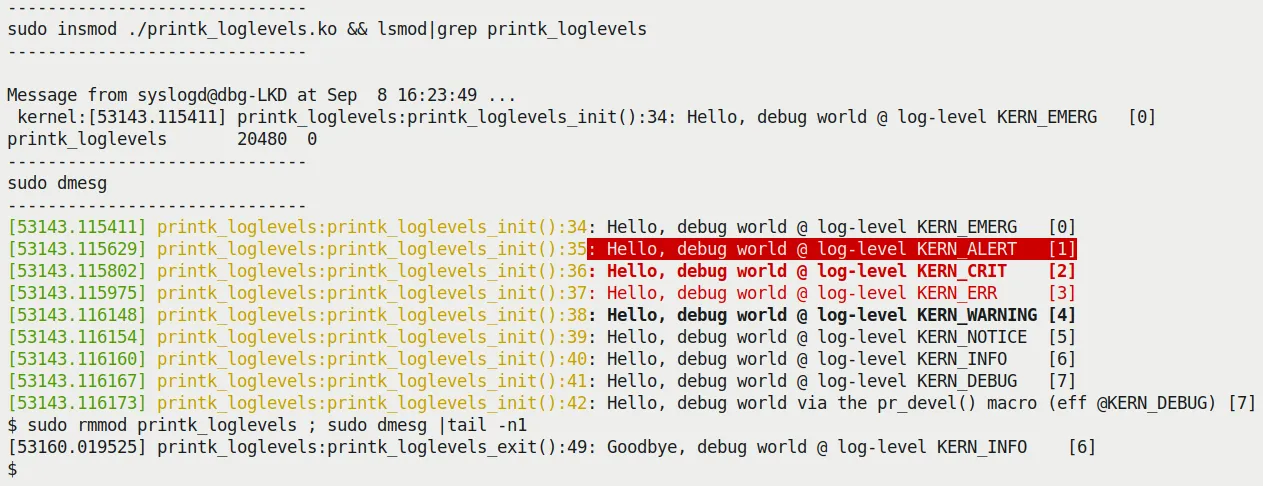 (Figure 3.1 – Output screenshot of the printk_loglevels module)
A few details here are worth pausing to examine:
- The prefix works: Notice the beginning of every log line:
printk_loglevels:init_module:XX:. That's the handiwork of ourpr_fmt()macro. This is a lifesaver when debugging, especially when multiple modules are spamming logs—you can immediately tell who's speaking. - Levels match up: The brackets on the right show the corresponding numeric level (
[0]to[7]). - Emergencies pop up: The
KERN_EMERG(level 0) message doesn't just go into the log buffer—it also pops up directly on all open console terminals. You can see theMessage from syslogd@...popup in the top half of the screenshot. - Color coding: Both
dmesgandjournalctlsupport color highlighting, which is very helpful for the human eye when filtering important information. - The permission wall: If you see
dmesgreturning nothing, don't panic. Modern distributions enableCONFIG_SECURITY_DMESG_RESTRICTby default to prevent information leaks. You need tosudoor grant the user the appropriate permission bits.
Where Do the Messages Go?
Alright, we know how to emit logs. But where do these characters ultimately end up?
This is a deeper question than it appears. Unlike user space's printf going straight to stdout, the kernel's "sewer system" is much more complex.
We can summarize its flow with a table (Table 3.1):
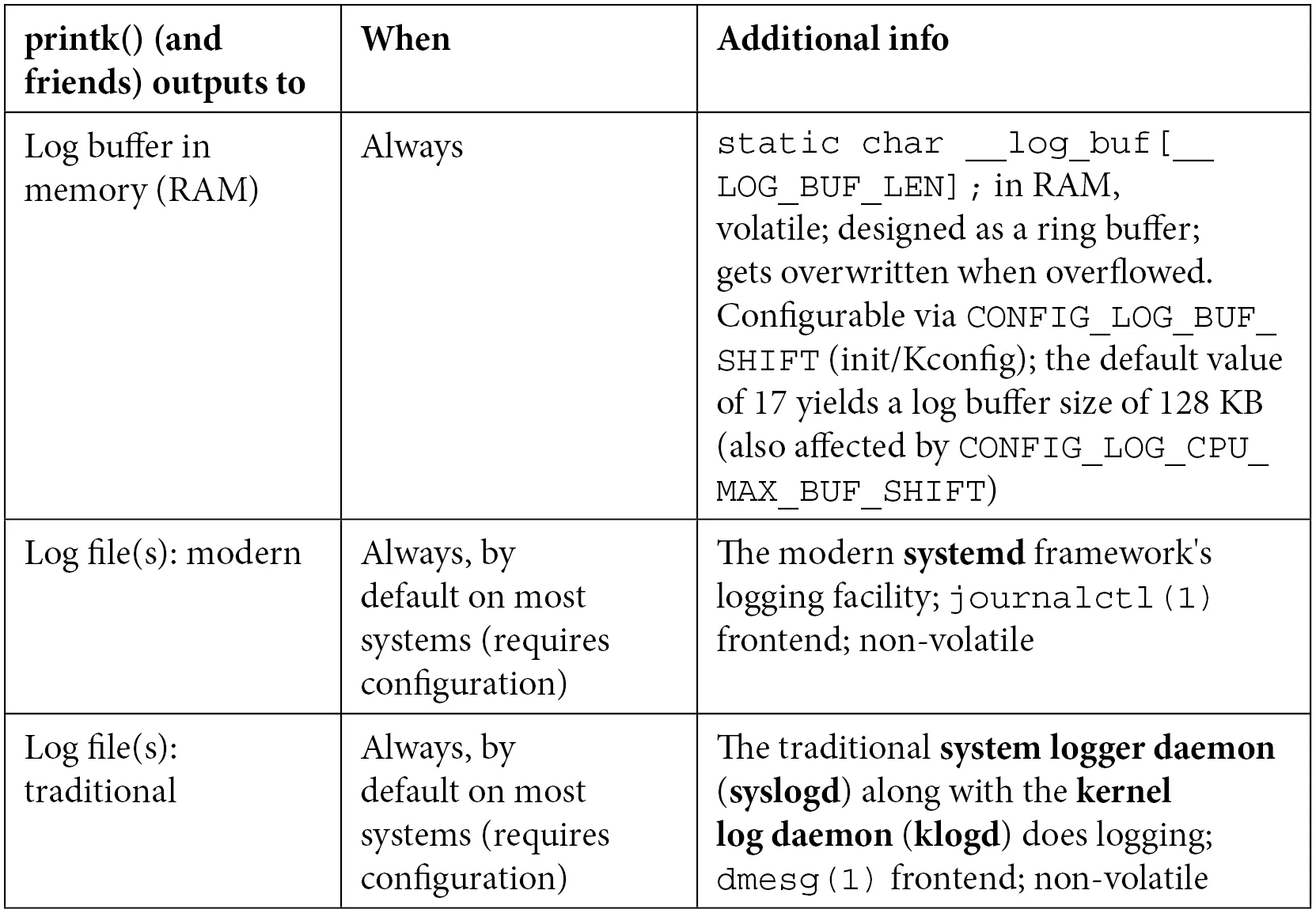 (Figure 3.1 – Schematic of printk output flow)
| Output Destination | Description | How to View |
|---|---|---|
| Kernel Ring Buffer | A fixed-size circular queue in memory; the first stop for all printk messages. | dmesg, /proc/kmsg |
| System Log Files | Read from the buffer by system daemons (like systemd/journald) and written to disk. | /var/log/syslog (Debian/Ubuntu)/var/log/messages (RHEL/CentOS) |
| Console Terminal | If the log level is low enough (severe enough), it flushes directly to the current terminal. | Direct screen output |
📊 The Ring Buffer and Console Level
First, let's be clear about one thing: printk does not write to stdout. Its first stop is the kernel ring buffer in memory.
This means logs are temporarily stored in memory. Once you reboot (unless you've enabled kexec or set up pstore persistence), the old logs are gone.
Whether they are simultaneously displayed on your console screen depends on the console log level. The kernel uses a variable to control this threshold.
You can check the current threshold like this:
$ cat /proc/sys/kernel/printk
4 4 1 7These four numbers represent:
- Current console log level: 4. Only messages with a level lower than 4 (more urgent) will appear on the console. That means
KERN_EMERG,KERN_ALERT,KERN_CRIT, andKERN_ERR. - Default console log level: 4.
- Minimum console log level: 1.
- Maximum console log level: 7.
If you want to blast all debug information (including KERN_DEBUG) onto the screen, you can (as root) change this value:
sudo echo 8 > /proc/sys/kernel/printkThis temporarily cranks it up to the maximum (higher than 7, meaning everything is enabled). But this is usually a bad idea—the kernel's DEBUG-level logs are vast; your screen will be instantly flooded, and it might even impact system performance.
📂 Log Files on Modern Systems
On modern Linux distributions (especially those under systemd's reign, like Ubuntu 20.04), log routing is slightly more complex.
Systemd is an "overbearing" init system that has taken over logging responsibilities. It doesn't just write logs to traditional files; it also maintains its own binary logging system.
Specifically, traditional text log files still exist, depending on your distribution family:
- Debian / Ubuntu family: check
/var/log/syslog - Red Hat / Fedora / CentOS family: check
/var/log/messages
You can use regular commands to browse them, but the more modern approach is journalctl.
Format Specifiers: The % Symbols You Might Not Know
When writing code, choosing the right format specifier matters. Here are a few common pitfalls:
- Case sensitivity: For
size_t(unsigned) andssize_t(signed), use%zuand%zdrespectively. - Printing pointers:
- Safety first: Use
%pK. It prints a hashed pointer value, preventing sensitive kernel addresses from leaking to ordinary users. This is a security requirement in modern kernels. - Real addresses: Use
%px. This prints the actual address value. Never use this in production code unless you know exactly what you're doing. - Physical addresses: Use
%pa. Note that you need to pass the address by reference.
- Safety first: Use
- Buffer dumps: Want to print a raw buffer in memory as a hex string? Use
%*ph(*replaces the length, suitable for buffers smaller than 64 bytes). For larger blocks, don't manually拼接 strings—use the dedicatedprint_hex_dump_bytes()helper function. - IP addresses: Use
%pI4for IPv4 and%pI6for IPv6.
If you want to see a complete "dictionary," the official kernel documentation has an exhaustive list:
Documentation/printk-formats.txt
Give it a glance—someday you'll need it.
With these ins and outs of printk under our belt, we've effectively grasped the weapon of "instrumentation." But in practice, knowing how to print isn't enough—we also need to know where to print, how to print efficiently, and how to avoid bringing the system down with our prints.
That's exactly what we'll dive into next.