5.3 Understanding the Fundamentals of KASAN
In the previous section, we laid out a long "wish list," exposing the various memory bugs that can lurk in the kernel. The question now is: how exactly does KASAN track down the culprits on this list one by one?
Before answering that, we need to establish a few key concepts. Without a clear grasp of these, reading KASAN logs later will feel like deciphering gibberish.
Compile-Time Instrumentation: How Does It Work?
First and foremost, KASAN is a dynamic analysis tool. What does that mean?
It means it doesn't find bugs by statically scanning code; it only works when the code is actually running. If a particular code path is never executed, or if your test cases aren't aggressive enough (failing to cover edge cases), KASAN is essentially useless. This is why I constantly stress the importance of "good test cases" and "Fuzzing"—if you don't hit the wall, KASAN won't sound the alarm.
This brings us to its core technique: Compile-Time Instrumentation.
The name sounds sophisticated, but the underlying principle is quite brute-force. When we compile the kernel using GCC or Clang with the -fsanitize=kernel-address option enabled, the compiler secretly inserts "check code" before and after every single memory access instruction.
What does this check code do?
It maintains an extra memory region called Shadow Memory.
You can think of shadow memory as the "ledger" for real memory—or, more vividly, as a security camera set up outside your house.
However, the camera analogy isn't entirely accurate: a camera passively records video, whereas KASAN's shadow memory actively intercepts accesses. Here's how it works: every 8 bytes of real memory map to 1 byte in shadow memory.
- If the shadow byte is
0, all 8 bytes are accessible. - If the shadow byte is
1, only the first byte is accessible. - If the shadow byte is a negative number (like
0xFF), the memory block is completely invalid.
But the reality is even more brute-force: every time you read from or write to memory, the compiler-inserted check code consults this "ledger" first. If the ledger says "red zone" or "freed," it triggers a panic right on the spot. It doesn't just log the problem; it executes immediate justice.
What's the Cost? When Can We Use It?
This brute-force checking comes with a cost, mainly from two aspects:
- Time (CPU): Every memory access requires a shadow memory lookup first. This adds extra instructions and can disrupt branch prediction.
- Space (RAM): The shadow memory itself consumes space.
Here is a counterintuitive fact: KASAN's CPU overhead is actually surprisingly low—typically only 2x to 4x. If you've ever used dynamic instrumentation tools like Valgrind (which usually incur a 20x to 50x overhead), you'll find KASAN incredibly fast.
The real pain point lies in RAM.
Remember that 1:8 ratio? For every 8 bytes of real memory, 1 byte of shadow memory is consumed. For an architecture like x86_64, which easily has a 128 TB kernel virtual address space (VAS), this means KASAN carves out 16 TB of virtual address space for shadow memory (even if physical RAM isn't entirely consumed, the address space resource is still occupied).
For enterprise servers, this is no big deal. But for resource-constrained embedded systems—like your Android phone, TV box, or low-end router—this overhead might simply be unbearable.
This is why the modern Linux kernel supports three different "tiers" of KASAN modes. We've summarized their behaviors in Table 5.2:
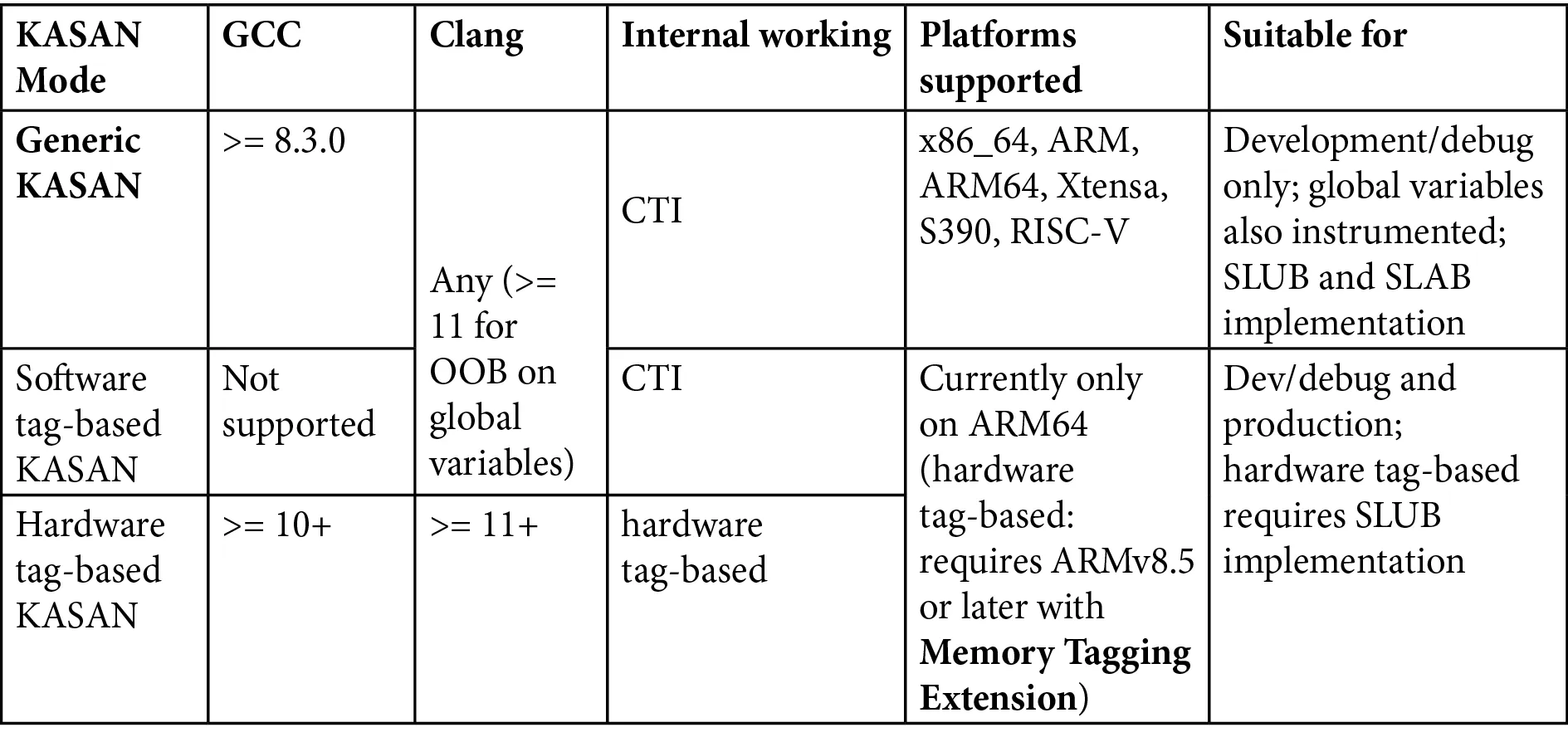 (Table 5.2: Comparison of the three KASAN modes and their overhead)
| Mode | Nickname | Memory/CPU Overhead | Use Case | Architecture Constraints |
|---|---|---|---|---|
| Generic KASAN | Generic | High / Medium | Active debugging, bug hunting | x86_64, ARM, ARM64, RISC-V, etc. |
| Software tag-based | Software Tag | Medium / Low | Real workload stress testing | ARM64 only |
| Hardware tag-based | Hardware Tag | Low / Very Low | Can even be used in production | ARM64 only (MTE) |
Returning to the "security camera" analogy:
- Generic KASAN is like assigning a 24/7 bodyguard to every single item in your house. It's secure, but incredibly expensive—you can only afford it during critical times (the debugging phase), not for everyday use.
- Tag-based modes are like attaching RFID tags to items. The security alarm only triggers when you try to walk out the door with them. This is much more lightweight.
Seeing this, you might ask: why is something so good (Tag-based modes) only available on ARM64?
The answer lies in the market. The Android ecosystem is almost entirely dominated by ARM64. Google desperately needs the ability to detect memory errors in production environments (on users' phones) because they can't ask hundreds of millions of users to run their phones with Generic KASAN enabled. Therefore, MTE (Memory Tagging Extension), a hardware-based feature, was introduced to make low-overhead memory checking possible.
Prerequisites: Compilers and Hardware
Since this is a compiler-based technology, the compiler version is critical. You can't expect a decades-old GCC to generate modern instrumentation code.
The current hard requirements are as follows:
- GCC: Must be 8.3.0 or later.
- Clang: Theoretically, any version works, but if you want to detect out-of-bounds accesses on global variables, you need Clang 11 or later.
On the hardware side, KASAN has traditionally been a privilege exclusive to the "64-bit club."
Why 64-bit?
Recall that 1:8 shadow memory ratio. On a 32-bit system, the address space is only 4GB. Slicing off 1/8th for shadow memory leaves very little room for anything else. Not to mention, the kernel address space is typically only 1GB or 3GB (depending on configuration), which would practically suffocate the kernel.
But things are changing.
If you look closely at the kernel documentation, you'll notice that Generic KASAN now supports the 32-bit ARM architecture—a new feature introduced in Linux kernel 5.11. This means that even older ARM development boards with limited computing power can benefit from this (though you will feel the memory pressure much more acutely).
As for the two seemingly more advanced Tag-based modes, they currently remain stubbornly limited to ARM64.
Why still ARM64?
Because of Android. The core of almost all modern smartphones, wearables, and smart TVs is ARM64. For the mobile ecosystem, the ability to catch memory errors in production environments at an extremely low cost is invaluable. This isn't just a technical choice; it's driven by business needs.
The Road Ahead
In the rest of this chapter, for the sake of demonstration, we will default to using Generic KASAN. This is not only because it supports the widest range of architectures (including the x86_64 PC or 32-bit ARM board you might have on hand), but also because it is the most aggressive and effective mode for debugging.
If you happen to have an ARM64 board handy, you can try switching to a Tag-based mode to experience that silky-smooth feeling of "even daring to enable it in production." But regardless of the mode, the underlying principles are the same—once you understand the shadow memory mechanism in Generic mode, the rest is just a difference in implementation details.