5.0 No Map, No Journey
One of the core tasks of the Linux network stack is to act as a transit hub—accurately forwarding packets that don't belong to the local machine to the next hop. This sounds simple, but when you're dealing with a core router on the internet backbone, it's an entirely different scale of problem. In this world, network topologies change in the blink of an eye, and massive amounts of routing information are updated every single second.
At this scale, relying on a system administrator to manually type ip route to maintain the table known as the FIB (Forwarding Information Base) isn't just futile—it's practically suicidal. In real production environments, this job is typically taken over by userspace routing daemons, which might even employ dedicated hardware acceleration cards to handle this flood of data. These daemons usually maintain their own mirror of the routing table and stand ready to synchronize with the kernel's routing table at all times.
What we'll dive deep into in this chapter is the routing subsystem—the decision-maker responsible for answering "where to next?"
Before jumping into the code, I want to take a moment to clarify one thing: what does forwarding actually mean? This isn't a trivial question, because understanding it fundamentally shapes how you view the packet path.
5.1 Forwarding and FIB: Starting with a Picture
Let's strip the problem down to its most basic state. Imagine you have two switches, each connecting a different local area network: LAN1 and LAN2.
- LAN1 is
192.168.1.0/24 - LAN2 is
192.168.2.0/24
Now, you have a Linux machine sitting between them, acting as a "forwarding router." This machine has two network interface cards:
eth0is connected to LAN1, with an IP of192.168.1.200eth1is connected to LAN2, with an IP of192.168.2.200
To keep things pure, let's assume this machine isn't running any firewall—meaning no artificial interference.
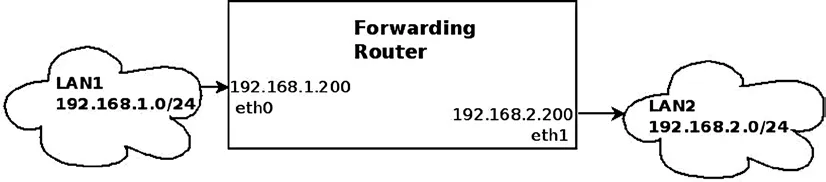
Figure 5-1: Forwarding packets between two LANs
When a packet from LAN1 arrives at eth0 and says "I want to go to LAN2," the Linux kernel must make a decision: keep it (because the destination address is mine), or forward it? If the latter, which door do we send it out through?
This process is routing. It's not just a table lookup; it's a sophisticated decision-making mechanism within the kernel network stack.
In this example, a packet coming in from eth0 destined for LAN2 will be classified by the kernel as "transit traffic." It won't climb all the way up to the transport layer (Layer 4) like local traffic ("Traffic to me") would, because there's no socket waiting on the other end to receive it. Pushing it to Layer 4 is a pure waste of CPU—every layer of protocol parsing incurs a cost.
This traffic gets intercepted at Layer 3 (the network layer). The kernel queries the routing table, confirms the egress interface is eth1, and throws it right out. The whole process is efficient, ruthless, and entirely devoid of emotion.

Figure 5-2: The three layers handled by the networking kernel stack
Here's a quick interlude about two terms you've definitely heard but might not have thought deeply about: default gateway and default route.
When you configure a default gateway in the routing table, you're essentially telling the kernel: "For all packets where you can't find a match in any other table entry, don't hesitate—just throw them all to this guy." This is the "last line of defense" in the networking world, typically represented as 0.0.0.0/0.
This is easy to understand—it's like sending a package: if you don't know the exact address, you at least know to "hand it all over to the post office." But this analogy has a trap: in the real world, the post office will return undeliverable mail to you; in the networking world, if the default route is misconfigured, your packets will vanish into a black hole without a sound.
You can add a default route via the ip command, pointing the egress to 192.168.2.1:
ip route add default via 192.168.2.1Or if you're still using the old-school route command:
route add default gateway 192.168.2.1Alright, now we've nailed down the basic concepts: what forwarding is, what the FIB is, and that lifesaving default route. But in the code, this lookup mechanism isn't just a simple table—it's a sophisticated subsystem.
Now, let's go see how the kernel actually finds a way out of this complex web when a packet truly arrives.