Chapter 1: Deep into the Kernel: Dissecting the Network Stack Black Box
Chapter Introduction
There is a class of problems where, when you try to solve them through network programming, the answer always lies deep within the kernel source code.
You might write perfectly fine TCP client code with rigorous logic and an elegant concurrency model, yet it still fails to saturate bandwidth in high-throughput scenarios. Or you might clearly configure iptables rules, but packets fly right through as if they had wings, completely unintercepted. At this point, continuing to spin your wheels in userspace code is useless—you need to understand what this black box is actually doing.
The mission of this chapter is to open that black box.
The Linux kernel networking subsystem is a precision machine. It must handle decades of historical baggage (like those ancient protocols) while adapting to the microsecond-level latency demands of modern hardware. We won't just memorize textbook terms like the OSI seven-layer model—we want to see exactly how packets travel through the kernel, where they get modified, where they get dropped, and where they are handed off to userspace.
Before we begin, one thing must be clear: the kernel doesn't handle everything. It is only responsible for the L2 to L4 interplay. As for what happens above, that's the application's job; what happens below, that's the hardware's job. What we are going to study is precisely this "soft underbelly" sandwiched in between.
1.1 The Linux Network Stack: From Textbook to Code Reality
If you've taken any networking course, the OSI seven-layer model is like that old poster pinned to the wall—it's always hanging there, but few people actually stare at it.
It divides network communication into seven logical layers.
Don't rush to turn the page—let's quickly run through them, not to memorize, but to establish a coordinate system:
- Physical Layer: This is the realm of electrical currents, optical signals, and hardware circuits. The Linux kernel doesn't touch this layer directly; that's the business of driver engineers and hardware vendors.
- Data Link Layer: This is where Ethernet NICs and drivers reside. It handles data transmission between two directly connected endpoints.
- Network Layer: Handles routing and addressing—namely, our familiar IPv4 and IPv6. The core of the Linux kernel networking subsystem lives right here.
- Transport Layer: This is the territory of TCP and UDP, responsible for end-to-end data delivery.
- Session Layer & 6. Presentation Layer: These two layers are practically "merged" or outright ignored in the real Linux network stack implementation. They are usually handled by the application protocols themselves.
- Application Layer: This is where your browser, SSH daemon, or your hand-crafted server program runs.
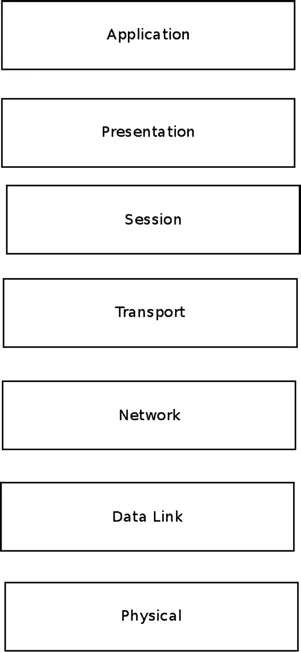 Figure 1-1. The OSI seven-layer model
That's about what the textbooks cover. Looks neat and tidy, right?
But when you open the Linux kernel code, you'll find that reality isn't so cleanly divided. What the kernel truly cares about are these three layers: L2 (Data Link Layer), L3 (Network Layer), and L4 (Transport Layer).
These three layers form the "iron triangle" of the Linux kernel network stack. Looking at the figure below, you'll see that the kernel is essentially a sandwich—it only processes those three middle layers, handing off everything above to userspace and everything below to hardware.
 Figure 1-2. The Linux Kernel Networking layers
A Packet's Journey Through the Kernel
A packet's journey after entering the kernel is essentially a continuous process of decision-making.
When a packet arrives from a NIC (L2), the first thing the kernel does is decide its fate: keep it for itself, or forward it to someone else?
If it is locally destined, the packet is passed from L2 up to L3 (stripping the IP header), then further up to L4 (stripping the TCP/UDP header), and finally placed into a socket's receive queue, waiting for a userspace program to read.
If it is forwarded, after the routing table is looked up at L3, the packet doesn't travel upward. Instead, it turns right back around, gets re-injected into the L2 transmit queue, and is sent out through another NIC.
If it is locally sent, the order is completely reversed: userspace data goes down through the Socket API to L4, where a TCP/UDP header is added; it moves down to L3, where an IP header is added; and finally, at L2, an Ethernet header is added before being handed to the NIC driver for transmission.
But here's the trap—don't make the mistake of thinking this is a straight line.
While shuttling between L2 and L4, a packet may undergo various "security checks" and "plastic surgery":
- Modified: For example, having its IP address rewritten by NAT rules, or being encrypted by IPsec.
- Dropped: For example, when firewall rules determine this is an illegal connection.
- Triggering feedback: For example, when a packet is too large and an ICMP "Fragmentation Needed" message must be sent.
- Fragmented or reassembled: IP fragmentation and reassembly happen right here.
- Verified: Every layer calculates a checksum; if the math is wrong, the packet is dropped, no questions asked.
This is the essence of the Linux network stack: a high-speed packet processing factory where data flows between L2, L3, and L4, constantly being inspected and forwarded.
As for the details of the Physical Layer (L1), that's the hardware driver's job; the kernel only cares about sending and receiving data frames. And the session management and data format conversion of L5 through L7—the kernel ignores all of that. That's the responsibility of userspace programs.
If you feel a bit overwhelmed right now, don't worry.
Our task at this point is to draw a map. In the following chapter, we will dive into every street on this map to see how those buildings named net_device, sk_buff, and NAPI are actually constructed.
For now, let's take a deep breath and prepare to enter the code.