Chapter 5: Time and Asynchronous Work in the Kernel
Section 2 — Technical Preparation and Environment
Before diving into the code, let's make sure we're all on the same page.
Assume you've read the Preface of the companion book Linux Kernel Programming and have a virtual machine running Ubuntu 18.04 LTS (or a newer stable release) ready to go. More importantly, you've already cloned this book's GitHub repository.
Hands-on practice is the soul of this chapter—reading without doing means you'll never truly know whether that timer is running in a softirq or in a process context.
The repository is here: GitHub - Linux Kernel Programming Part-2.
Get your environment set up and the code pulled down, and we'll be ready to insmod at any moment.
Delaying for a given time in the kernel
Imagine this scenario: you're staring at your driver code, and suddenly the system freezes without any warning. You reboot, check the logs, and find the stack is completely trashed. After a painful debugging session, you finally discover the culprit—you naively called a seemingly harmless msleep(10) inside an interrupt handler.
This isn't just a crash; it's a philosophical question: In the kernel, when we say "wait a moment," what exactly are we waiting for?
Your driver code often needs to "pause briefly before proceeding." In kernel space, this is done through a set of Delay APIs. But before you start coding, you must understand a fundamental question:
During the time you're waiting, do you plan to busy-wait (hogging the CPU), or are you willing to sleep (yielding the CPU to others)?
This isn't just a matter of programming style—it directly determines which API you'll use and whether your system will mysteriously freeze like in the story above.
At a high level, the kernel provides only two categories of delay mechanisms:
- Non-blocking/atomic delays (
*delay()APIs): These delays never cause the current process to sleep (schedule out)—commonly known as "busy-waiting." - Blocking delays (
*sleep()APIs): These delays put the current process context to sleep (by callingschedule()), yielding the CPU.
Think of it like waiting at an ATM:
- Busy-waiting is like glaring at the screen—no one behind you can do anything, and you're hogging the resource.
- Sleeping is like taking a ticket and sitting down to check your phone, letting others use the machine until your number is called.
If you've read the chapters on CPU scheduling (like Chapters 10 and 11 of Linux Kernel Programming), you'll know that schedule() implies a context switch. This leads to a matter-of-life-and-death principle:
Never call
schedule()in atomic or interrupt context.
"Atomic context" here is a broad term: hard interrupts, softirqs, tasklets, and critical sections protected by spinlocks. In these contexts, you have no right to sleep.
Context is everything
When writing code, you must constantly be aware of the current execution context. If you're inside an interrupt handler (Top Half or Bottom Half), your top priority is to get in and get out fast. Lingering in such a context—or even needing a delay—is inherently a design flaw.
Returning to the ATM analogy: If you're an interrupt handler, you're putting out an emergency fire. You can't just "sit down for a bit." You must stare intently (busy-wait). It wastes power, but for safety, there's no other choice.
But if you absolutely must wait, you can only use the first category of APIs: non-blocking *delay().
Here are two simple ironclad rules:
- Use
*delay(): When you're in atomic context (interrupts, soft IRQs, etc.), or you need an extremely short delay (< 1 millisecond). In this context, you cannot sleep; you can only spin the CPU. - Use
*sleep(): When you're in process context and the current process is allowed to sleep (e.g., not holding a spinlock). Typically used for longer delays greater than 1 millisecond.
Note: Even if you're in process context, if you're inside a critical section protected by a spinlock, it's essentially "atomic"—if you dare to sleep here, deadlock will come knocking.
Understanding how to use the *delay() atomic APIs
Alright, let's look at the first category—the stubborn ones that refuse to sleep.
The table below summarizes the commonly used non-blocking delay APIs in kernel module development. They are designed specifically for places where calling schedule() is absolutely forbidden.
| API | Comment |
|---|---|
ndelay(ns); | Delay for ns nanoseconds. |
udelay(us); | Delay for us microseconds. |
mdelay(ms); | Delay for ms milliseconds. |
Table 5.1 – The *delay() non-blocking APIs
There are a few crucial details you need to know, or you'll step into traps:
- Header file: When using these macros/APIs, make sure to include
<linux/delay.h>. - Don't mix units: Use the function that matches the level of delay you need. For example, to delay 30 milliseconds, you should call
mdelay(30), notudelay(30*1000). The kernel source code explicitly states (linux/delay.h): ifloops_per_jiffyis very high (meaning BogoMIPS is high), usingudelay()to delay several milliseconds can cause an overflow. - Underlying implementation: The implementation of these APIs is somewhat "layered."
- The high-level wrapper is in
<linux/delay.h>. - The low-level architecture-specific implementation is in
<asm-<arch>/delay.h>or<asm-generic/delay.h>. - The linker automatically selects the correct low-level implementation for you.
- The high-level wrapper is in
Essentially, ndelay and mdelay both end up calling udelay(). And udelay() is fundamentally a tight assembly busy-loop. You can see its true face in arch/x86/lib/delay.c under __const_udelay().
Since it's a busy-loop, how does the kernel know how many times to loop?
This is where BogoMIPS comes from.
- Early in the boot process, the kernel performs a calibration.
- It calculates how many empty loop iterations are needed to exhaust one timer tick (one jiffy) on this specific hardware.
- This value is called
loops_per_jiffy(lpj). - The converted MIPS value is BogoMIPS.
You can see this value in dmesg, for example, on my Core-i7:
Calibrating delay loop (skipped), value calculated using timer frequency.. 5199.98 BogoMIPS (lpj=10399968)For delays exceeding MAX_UDELAY_MS (typically 5ms), the kernel internally actually loops over calls to udelay().
⚠️ Warning: The *delay() API must be used in atomic context (like an interrupt handler) because they guarantee that schedule() will never occur. To help you catch errors, the kernel provides a debug macro called might_sleep(). If the kernel calls might_sleep() in a piece of code, it means that code is expected to run in process context. If you call it in atomic context, you'll get a glaring stack dump—which is a good thing, helping you find bugs early.
Of course, you can also use these APIs in process context; it's just impolite (like standing at the counter when you could be sitting down).
Understanding how to use the *sleep() blocking APIs
Now let's look at the second category—the well-behaved ones that are willing to sleep.
These APIs can only be safely used in process context. The way they work is: the current process goes to sleep, the kernel calls schedule() to switch away, and wakes it up when the time is up.
| API | Internally "backed by" | Comment |
|---|---|---|
usleep_range(umin, umax); | hrtimers (high-resolution timers) | Sleep for between umin and umax microseconds. Use where the wakeup time is flexible. This is the recommended API to use. |
msleep(ms); | jiffies/legacy_timers | Sleep for ms milliseconds. Typically meant for a sleep with a duration of 10 ms or more. |
msleep_interruptible(ms); | jiffies/legacy_timers | An interruptible variant of msleep(ms);. |
ssleep(s); | jiffies/legacy_timers | Sleep for s seconds. This is meant for sleeps > 1 s (wrapper over msleep()). |
Table 5.2 – The *sleep*() blocking APIs
Similarly, there are some tricks to know here:
Header file: Remember to include
<linux/delay.h>.Process context only: All of these APIs trigger a sleep internally, so they absolutely cannot be used in atomic context (like inside an interrupt).
Recommend
usleep_range(): If you need a short sleep, this is the first choice. Why? We'll get to that below.Interruptible vs. uninterruptible:
msleep()is uninterruptible; it calls__set_current_state(TASK_UNINTERRUPTIBLE).msleep_interruptible()is interruptible; it sets the state toTASK_INTERRUPTIBLE.
If the user presses
^Cor sends a signal,msleep_interruptible()will wake up early. This aligns with the UNIX design philosophy: provide mechanisms, not policies. As a general-purpose driver, you should consider respecting the user's intent and use the interruptible version.
Rules of thumb for timing:
- Over 10 milliseconds: use
msleep()ormsleep_interruptible(). - Over 1 second: use
ssleep().
ssleep() is essentially a simple wrapper over msleep(seconds * 1000).
How does the kernel sleep?
When you call msleep(ms), the kernel actually does this:
__set_current_state(TASK_UNINTERRUPTIBLE);
return schedule_timeout(timeout);And the core logic of schedule_timeout() is:
- Set a kernel timer (which we'll cover in the next section)—set an alarm.
- Call
schedule()to yield the CPU. - When the alarm goes off or a signal arrives, the process is woken up.
Here's a handy trick: if you want to implement something similar to user space's sleep(3), you can directly use schedule_timeout(). We wrote a delay_sec() function in convenient.h:
#ifdef __KERNEL__
void delay_sec(long);
/*------------ delay_sec --------------------------------------------------
 * Delays execution for @val seconds.
 * If @val is -1, we sleep forever!
 * MUST be called from process context.
 * (We deliberately do not inline this function; this way, we can see it's
 *  entry within a kernel stack call trace).
 */
void delay_sec(long val)
{
    asm (""); // force the compiler to not inline it!
    if (in_task()) {
        set_current_state(TASK_INTERRUPTIBLE);
        if (-1 == val)
            schedule_timeout(MAX_SCHEDULE_TIMEOUT);
        else
            schedule_timeout(val * HZ);
    }
}
#endif /* #ifdef __KERNEL__ */Taking timestamps within kernel code
Now that we've learned so many ways to delay, how do we know if they're accurate? We need a ruler.
In user space, we're used to gettimeofday(2). In the kernel, the most common approach is the ktime_get_*() family. For our current needs, this API is sufficient:
u64 ktime_get_real_ns(void);It returns the number of nanoseconds since the Epoch. If you need higher performance or NMI safety, you can use ktime_get_real_fast_ns().
With this, we can easily calculate code execution time:
#include <linux/ktime.h>
t1 = ktime_get_real_ns();
foo();
bar();
t2 = ktime_get_real_ns();
time_taken_ns = (t2 - t1);For convenience, we defined a macro SHOW_DELTA(later, earlier) in convenient.h that directly prints the time difference.
Let's try it – how long do delays and sleeps really take?
Enough theory—it's time to test it on the board.
We wrote a delays_sleeps driver that sequentially tests these APIs and prints out the actual time consumed.
We defined a macro DILLY_DALLY() to do the dirty work:
// ch5/delays_sleeps/delays_sleeps.c
/*
 * DILLY_DALLY() macro:
 * Runs the code @run_this while measuring the time it takes; prints the string
 * @code_str to the kernel log along with the actual time taken (in ns, us
 * and ms).
 * Macro inspired from the book 'Linux Device Drivers Cookbook', PacktPub.
 */
#define DILLY_DALLY(code_str, run_this) do {    \
    u64 t1, t2;                                 \
    t1 = ktime_get_real_ns();                   \
    run_this;                                   \
    t2 = ktime_get_real_ns();                   \
    pr_info(code_str "-> actual: %11llu ns = %7llu us = %4llu ms\n", \
        (t2-t1), (t2-t1)/1000, (t2-t1)/1000000);\
} while(0)Then, in the init function, we ran a battery of tests:
    /* Atomic busy-loops, no sleep! */
    pr_info("\n1. *delay() functions (atomic, in a delay loop):\n");
    DILLY_DALLY("ndelay() for         10 ns", ndelay(10));
    /* udelay() is the preferred interface */
    DILLY_DALLY("udelay() for     10,000 ns", udelay(10));
    DILLY_DALLY("mdelay() for 10,000,000 ns", mdelay(10));

    /* Non-atomic blocking APIs; causes schedule() to be invoked */
    pr_info("\n2. *sleep() functions (process ctx, sleeps/schedule()'s out):\n");
    /* usleep_range(): HRT-based, 'flexible'; for approx range [10us - 20ms] */
    DILLY_DALLY("usleep_range(10,10) for 10,000 ns", usleep_range(10, 10));
    /* msleep(): jiffies/legacy-based; for longer sleeps (> 10ms) */
    DILLY_DALLY("msleep(10) for      10,000,000 ns", msleep(10));
    DILLY_DALLY("msleep_interruptible(10)         ", msleep_interruptible(10));

    /* ssleep() is a wrapper over msleep(): = msleep(ms*1000); */
DILLY_DALLY("ssleep(1) ", ssleep(1));Run it, and the results might surprise you (Figure 5.1):
- Behavior of
*delay(): You'll find that the actual time taken byudelay(10)andmdelay(10)is often shorter than expected. - Behavior of
*sleep(): You'll find that the actual time taken bymsleep(10)is often longer than expected.
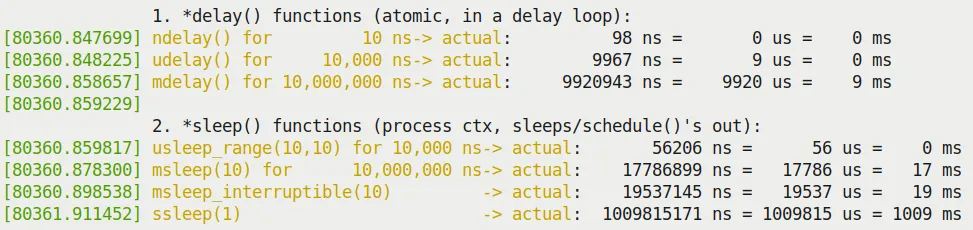 Figure 5.1 – Partial output screenshot of our delays_sleeps.ko kernel module
Why is this?
*delay()finishing early: The kernel documentationinclude/linux/delay.hexplains this. There are three possible reasons:- The calculated
loops_per_jiffyis on the low side (because handling interrupts itself takes time). - Cache behavior affects loop execution speed.
- CPU frequency scaling occurred.
- The calculated
*sleep()finishing late: Because the scheduler needs time to wake up the process, and once awake, the process still has to queue up for the CPU. In a non-real-time OS (standard Linux), this is expected behavior.
Conclusion: Delays in the kernel are always "at least" this much time, not "exactly" this much time. If you have hard real-time requirements, standard Linux can't do it; you need an RTOS patch, or you should put high-frequency logic in user space using POSIX timers.
Regarding usleep_range(): You might ask, why is it recommended?
Because by providing a range (min, max), the kernel has the opportunity to coalesce timers, optimize power consumption, and even cooperate with C-states to save power. If you set min and max to the same value (like usleep_range(10, 10)), the kernel's checkpatch script will even give you a WARNING:
WARNING: usleep_range should not use min == max args; see Documentation/timers/timers-howto.rstIt suggests you should leave some margin, like usleep_range(10, 15).
The "sed" drivers – to demo kernel timers, kthreads, and workqueues
Knowing how to delay isn't enough. If you need to do this continuously in the background and be able to stop it at any time, how would you design it?
To demonstrate the content of the next few sections (kernel timers, kernel threads, and workqueues), we designed an interesting driver project: sed.
This has nothing to do with the famous stream editor sed(1); it stands for Simple Encrypt Decrypt.
The core requirement of this project is to simulate an encryption/decryption operation with a timeout limit. If the operation isn't completed within the specified time, it counts as a failure.
We will evolve three versions of the driver:
- sed1: Uses kernel timers for timeout detection.
- sed2: Uses a kernel thread to do the heavy lifting, with the timer handling the timeout.
- sed3: Uses a workqueue to do the heavy lifting.
These three versions will help you understand the differences and connections between these three mechanisms.
Setting up and using kernel timers
Timers are software alarm clocks.
In user space, when an alarm goes off, it usually sends a signal (SIGALRM). In kernel space, the logic is slightly more convoluted: when a timer expires, the kernel's timer softirq (TIMER_SOFTIRQ) is triggered, and your callback function is executed within this softirq context.
Remember this: A timer's callback function runs in softirq context (atomic context). This means you cannot do anything that might block inside the callback, you cannot access user-space memory, and you cannot allocate memory except through GFP_ATOMIC.
Using kernel timers
To use kernel timers, you typically follow these steps:
- Define and initialize a
struct timer_liststructure.- Use the
timer_setup()macro to initialize it. - Set the callback function.
- Set the expiration time (
expires, based on jiffies).
- Use the
- Write the callback function.
- The signature must be
void (*function)(struct timer_list *timer).
- The signature must be
- Start the timer.
- Call
add_timer()ormod_timer().
- Call
- Handle the timeout.
- When the time arrives, the kernel automatically calls your callback function.
- For periodic tasks.
- Call
mod_timer()again inside the callback function to reset the time.
- Call
- Delete the timer.
- Use
del_timer()ordel_timer_sync(). del_timer_sync()ensures the callback function is no longer executing before returning, making it safer.
- Use
Let's look at the key members of the core structure struct timer_list:
// include/linux/timer.h
struct timer_list {
    // ...
    unsigned long expires;
    void (*function)(struct timer_list *);
    u32 flags;
    // ...
};The initialization macro timer_setup():
timer_setup(timer, callback, flags);@timer: Pointer to the structure.@callback: Callback function.@flags: Usually 0. It can also beTIMER_DEFERRABLE(power-saving, don't wake the CPU) orTIMER_PINNED(pin to a specific CPU).
Our simple kernel timer module – code view 1
Let's start with the simplest example (code path: ch5/timer_simple).
We defined a context structure st_ctx that holds a timer_list and a counter data:
// ch5/timer_simple/timer_simple.c
#include <linux/timer.h>
// ...

static struct st_ctx {
    struct timer_list tmr;
    int data;
} ctx;
static unsigned long exp_ms = 420; // 延迟 420 毫秒The initialization code looks like this:
static int __init timer_simple_init(void)
{
    ctx.data = INITIAL_VALUE; // 设为 3

    /* Initialize our kernel timer */
    // 计算过期时间:当前 jiffies + 420ms 对应的 jiffies 数
    ctx.tmr.expires = jiffies + msecs_to_jiffies(exp_ms);
    ctx.tmr.flags = 0;
    // 初始化定时器,绑定回调函数 ding
    timer_setup(&ctx.tmr, ding, 0);

    pr_info("timer set to expire in %ld ms\n", exp_ms);
    add_timer(&ctx.tmr); /* Arm it; let's get going! */
    return 0;     /* success */
}The key here is msecs_to_jiffies(). It converts human-readable milliseconds into the kernel's time base—jiffies. jiffies is a kernel global variable that increments by 1 on every clock interrupt.
Our simple kernel timer module – code view 2
When the timer expires, the kernel calls the ding() function:
static void ding(struct timer_list *timer)
{
    struct st_ctx *priv = from_timer(priv, timer, tmr);
    /* from_timer() 是 container_of() 的封装!这招太常用了。
     * 它的作用是通过结构体成员的指针,找到整个结构体(ctx)的指针。 */
    pr_debug("timed out... data=%d\n", priv->data--);
    PRINT_CTX(); // 打印当前上下文信息

    /* until countdown done, fire it again! */
    if (priv->data)
        mod_timer(&priv.tmr, jiffies + msecs_to_jiffies(exp_ms));
}You really need to learn the from_timer() macro; it's essentially container_of():
#define from_timer(var, callback_timer, timer_fieldname) \
container_of(callback_timer, typeof(*var), timer_fieldname)Execution results:
Figure 5.2 shows the dmesg output when running timer_simple.ko.
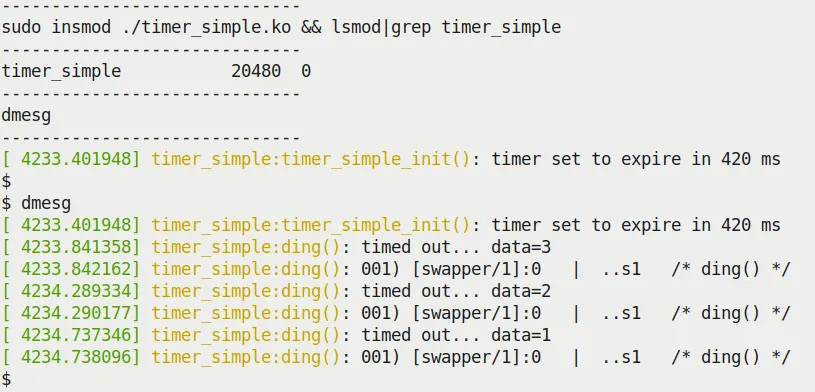 Figure 5.2 – Running our timer_simple.ko kernel module
Look closely at the timestamps, and you'll notice that the interval between callbacks is roughly a little over 420ms (like 448ms). This is normal due to scheduling overhead and the time consumed by printk itself.
More importantly, the PRINT_CTX() output reveals that the callback function is running in softirq context:
[ 4234.290177] timer_simple:ding(): 001) [swapper/1]:0 | ..s1 /* ding() */Note the s, which stands for softirq.
sed1 – implementing timeouts with our demo sed1 driver
Now let's return to our sed project.
The logic of sed1 is simple:
- User space sends an encryption request via
ioctl. - The driver starts a timer (e.g., with a 1ms timeout).
- The driver starts working.
- If the work is finished, cancel the timer -> success.
- If the timer fires first -> failure.
We intentionally left a backdoor make_it_fail so you can simulate a timeout failure.
The code logic is in the encrypt_decrypt_payload() function:
// ch5/sed1/sed1_driver/sed1_drv.c
static void encrypt_decrypt_payload(int work, struct sed_ds *kd, struct sed_ds *kdret)
{
    // ...
    /* Start - the timer; set it to expire in TIMER_EXPIRE_MS ms */
    mod_timer(&priv->timr, jiffies + msecs_to_jiffies(TIMER_EXPIRE_MS));
    t1 = ktime_get_real_ns();

    // perform the actual processing on the payload
    // ... 加密逻辑 ...

    // work done!
    if (make_it_fail == 1)
        msleep(TIMER_EXPIRE_MS + 1); // 故意超时!
    t2 = ktime_get_real_ns();

    // work done, cancel the timeout
    if (del_timer(&priv->timr) == 0)
        pr_debug("cancelled the timer while it's inactive! (deadline missed?)\n");
    else
        pr_debug("processing complete, timeout cancelled\n");
    SHOW_DELTA(t2, t1);
}And the timer callback function timesup() modifies the state and reports an error:
static void timesup(struct timer_list *timer)
{
    struct stMyCtx *priv = from_timer(priv, timer, timr);

    atomic_set(&priv->timed_out, 1);
    pr_notice("*** Timer expired! ***\n");
    PRINT_CTX();
}If you set make_it_fail=1 and insert the module, you'll see the tragic scene in Figure 5.4.
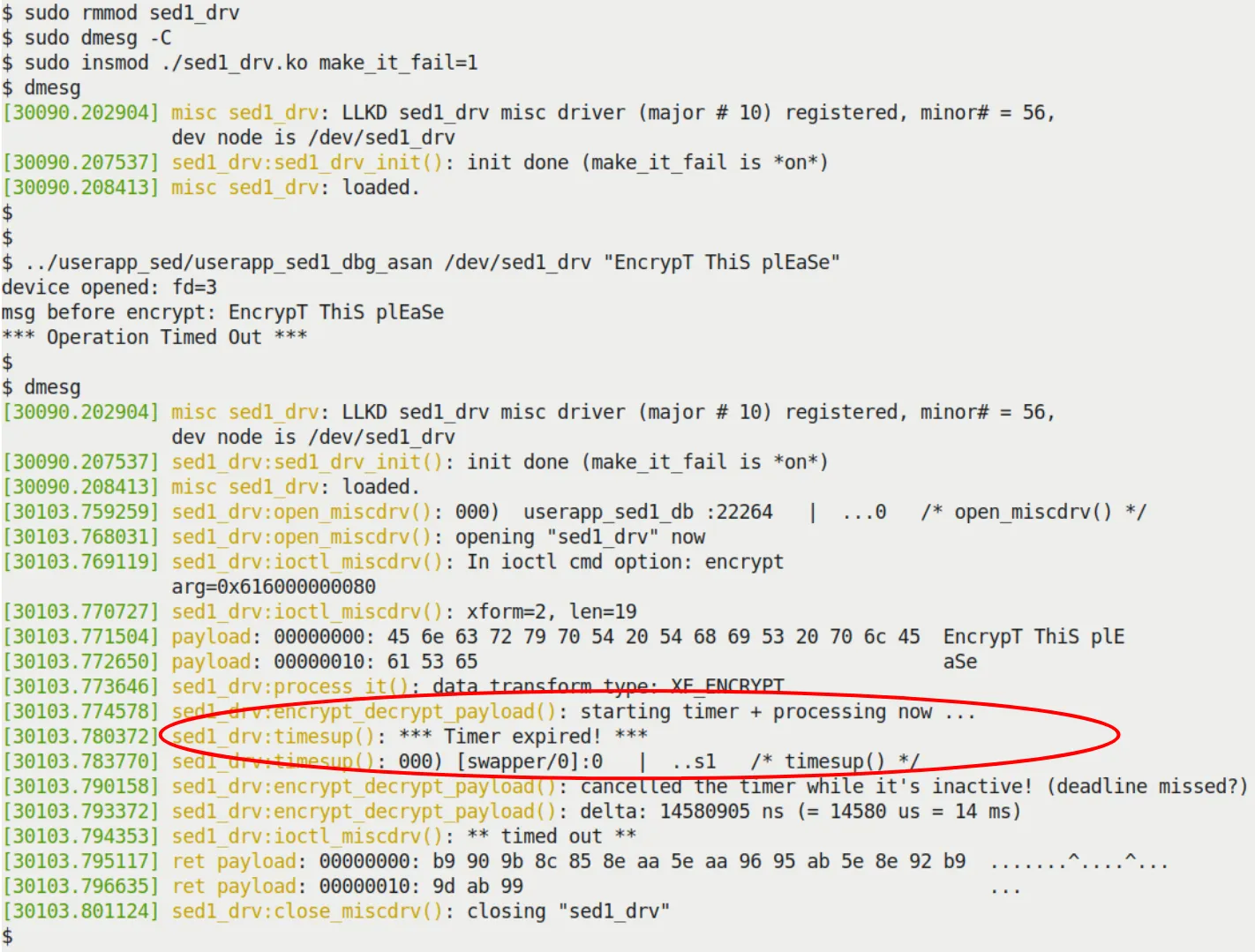 Figure 5.4 – Our sed1 project missing the deadline when make_it_fail=1
Creating and working with kernel threads
Kernel threads (kthreads) are threads running in kernel space. They are also processes (they have a task_struct), but they only run kernel code and have no user-space address space (mm is NULL).
Why use kernel threads?
When you need to do time-consuming, potentially blocking work in the background, a timer's "part-time" softirq mechanism is no longer appropriate. You need a real process context where you can safely call msleep(), or even access user space (though this is generally not recommended directly).
Quickly identifying kernel threads: Run ps aux; any name enclosed in square brackets [...] is a kernel thread.
root           2  0.0  0.0      0     0 ?          S    06:20   0:00 [kthreadd]
root           3  0.0  0.0      0     0 ?          I<   06:20   0:00 [rcu_gp]
root 10 0.0 0.0 0 0 ? S 06:20 0:00 [ksoftirqd/0]- The ancestor of all kernel threads is
kthreaddwith PID 2. - They run in process context and can be scheduled.
- They typically run in an infinite loop: sleep -> get woken up -> do work -> sleep again.
A simple demo – creating a kernel thread
The most convenient API for creating a kernel thread is kthread_run(). It's essentially a one-two punch combining kthread_create() and wake_up_process().
// include/linux/kthread.h
#define kthread_run(threadfn, data, namefmt, ...) \
({ \
    struct task_struct *__k \
        = kthread_create(threadfn, data, namefmt, ## __VA_ARGS__); \
    if (!IS_ERR(__k)) \
        wake_up_process(__k); \
    __k; \
})We demonstrated how to create a thread in ch5/kthread_simple, make it sleep, and then wait for a signal to wake it up.
static int kthread_simple_init(void)
{
    // ...
    gkthrd_ts = kthread_run(simple_kthread, NULL, "llkd/%s", KTHREAD_NAME);
    if (IS_ERR(gkthrd_ts)) {
        // ...
    }
    get_task_struct(gkthrd_ts); // 增加引用计数,防止任务提前消失
    // ...
}The logic of the thread function simple_kthread():
static int simple_kthread(void *arg)
{
    PRINT_CTX(); // 会显示这是进程上下文
    if (!current->mm)
        pr_info("mm field NULL, we are a kernel thread!\n");

    allow_signal(SIGINT);
    allow_signal(SIGQUIT);

    while (!kthread_should_stop()) {
        pr_info("FYI, I, kernel thread PID %d, am going to sleep now...\n",
            current->pid);
        set_current_state(TASK_INTERRUPTIBLE);
        schedule(); // 睡觉去

        /* Aaaaaand we're back! Check if signal hit us */
        if (signal_pending(current))
            break;
    }

    set_current_state(TASK_RUNNING);
    pr_info("FYI, I, kernel thread PID %d, have been rudely awoken; I shall"
            " now exit... Good day Sir!\n", current->pid);
    return 0;
}Note: kthread_should_stop() is a very useful mechanism. When you call kthread_stop() in your module's cleanup function, the kthread_should_stop() inside the running thread will return true, giving the thread a chance to safely exit the loop.
static void kthread_simple_exit(void)
{
    kthread_stop(gkthrd_ts); // 会等待线程真正退出
    pr_info("kthread stopped, and LKM removed.\n");
}The sed2 driver – design and implementation
sed2 is an upgraded version of sed1.
Core difference: We threw the heavy lifting of encryption/decryption to a dedicated kernel thread instead of doing it in the ioctl's process context.
This introduces some design challenges:
- Data passing: Because the kernel thread has its own context, you can't directly use
copy_to_userto return data to user space. - Concurrency issues: The ioctl process and the kernel thread run concurrently. If user space sends two requests in a row, things could get messy. Here we used a crude "polling" approach to avoid locking (since we haven't covered locks yet)—in production, please use locks.
Flow:
ioctl(ENCRYPT)copies data to the kernel -> wakes the worker thread -> polls waiting for work to complete.- The worker thread wakes up -> starts the timer -> does the work -> cancels the timer -> marks completion.
ioctlfinishes polling -> returns.
Figures 5.8 and 5.9 show the sed2 in action.
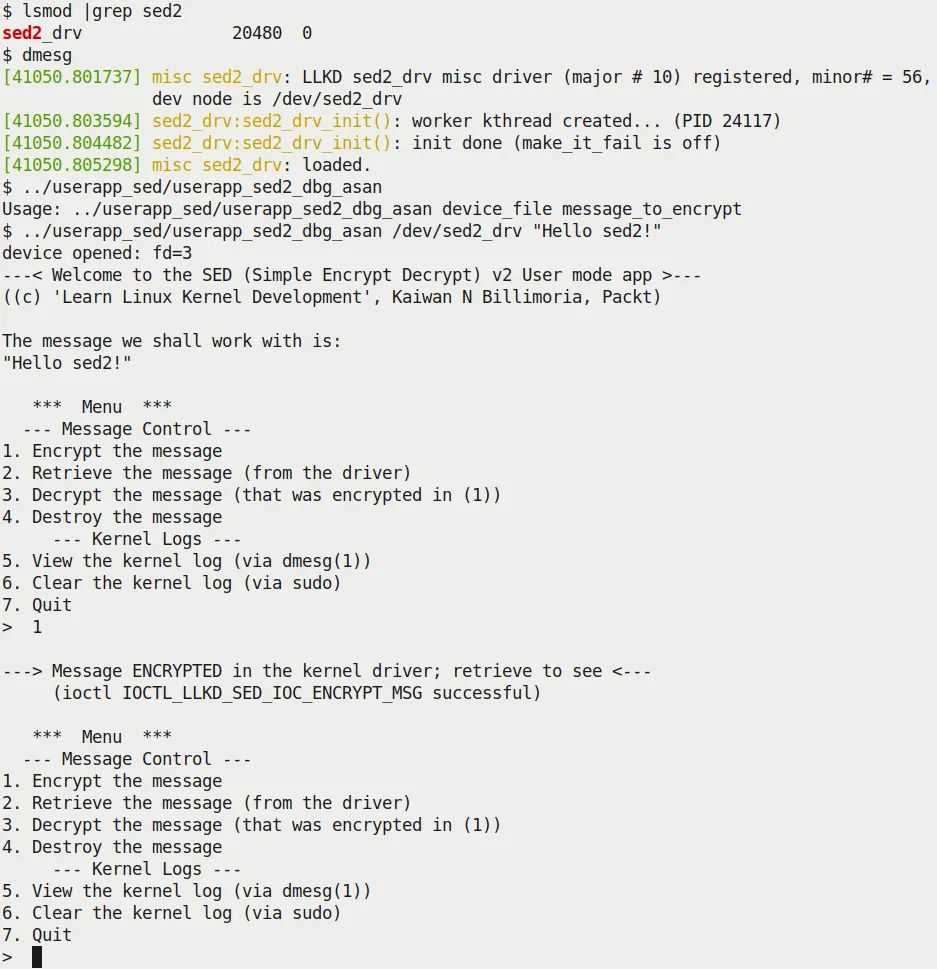 Figure 5.8 – Our sed2 project showcasing the interactive menu system
Using kernel workqueues
Directly creating and managing kernel threads is flexible but cumbersome and error-prone (e.g., deadlocks, management chaos).
The kernel provides a higher-level abstraction: workqueues.
The essence of a workqueue is: the kernel creates and manages a thread pool for you. You throw work into it, and the kernel finds an idle thread to run it.
This is modern Linux's Concurrency Managed Workqueue (cmwq) mechanism.
Features:
- Workqueue callback functions run in process context (executed by worker threads).
- They can safely sleep and block.
- They cannot directly access user space (because they are run by kernel threads).
- The kernel maintains a default global workqueue (
events). Usually, this is all you need, saving you the trouble of creating your own.
Using the kernel-global workqueue
Using the global workqueue takes only two steps:
- Initialize the
struct work_struct.cINIT_WORK(struct work_struct *_work, work_func_t _func); - Schedule it.c
bool schedule_work(struct work_struct *work);
If you want to delay execution for a while, use schedule_delayed_work(), and the structure changes to struct delayed_work.
Our simple work queue kernel module – code view
Let's repurpose our previous timer_simple (ch5/workq_simple).
This time, the timer callback function ding() no longer does the actual work; it only schedules the workqueue:
static void ding(struct timer_list *timer)
{
    struct st_ctx *priv = from_timer(priv, timer, tmr);
    // ...
    /* Now 'schedule' our work queue function to run */
    if (!schedule_work(&priv->work))
        pr_notice("our work's already on the kernel-global workqueue!\n");
}The real work is done by work_func():
/* work_func() - our workqueue callback function! */
static void work_func(struct work_struct *work)
{
    struct st_ctx *priv = container_of(work, struct st_ctx, work);

    t2 = ktime_get_real_ns();
    pr_info("In our workq function: data=%d\n", priv->data);
    PRINT_CTX();
    SHOW_DELTA(t2, t1);
}Note: Here we used container_of to get our st_ctx structure pointer from the work_struct pointer.
See Figure 5.12 for the execution results. You'll see that PRINT_CTX() shows it's running in process context (kworker/1:0) and is interruptible.
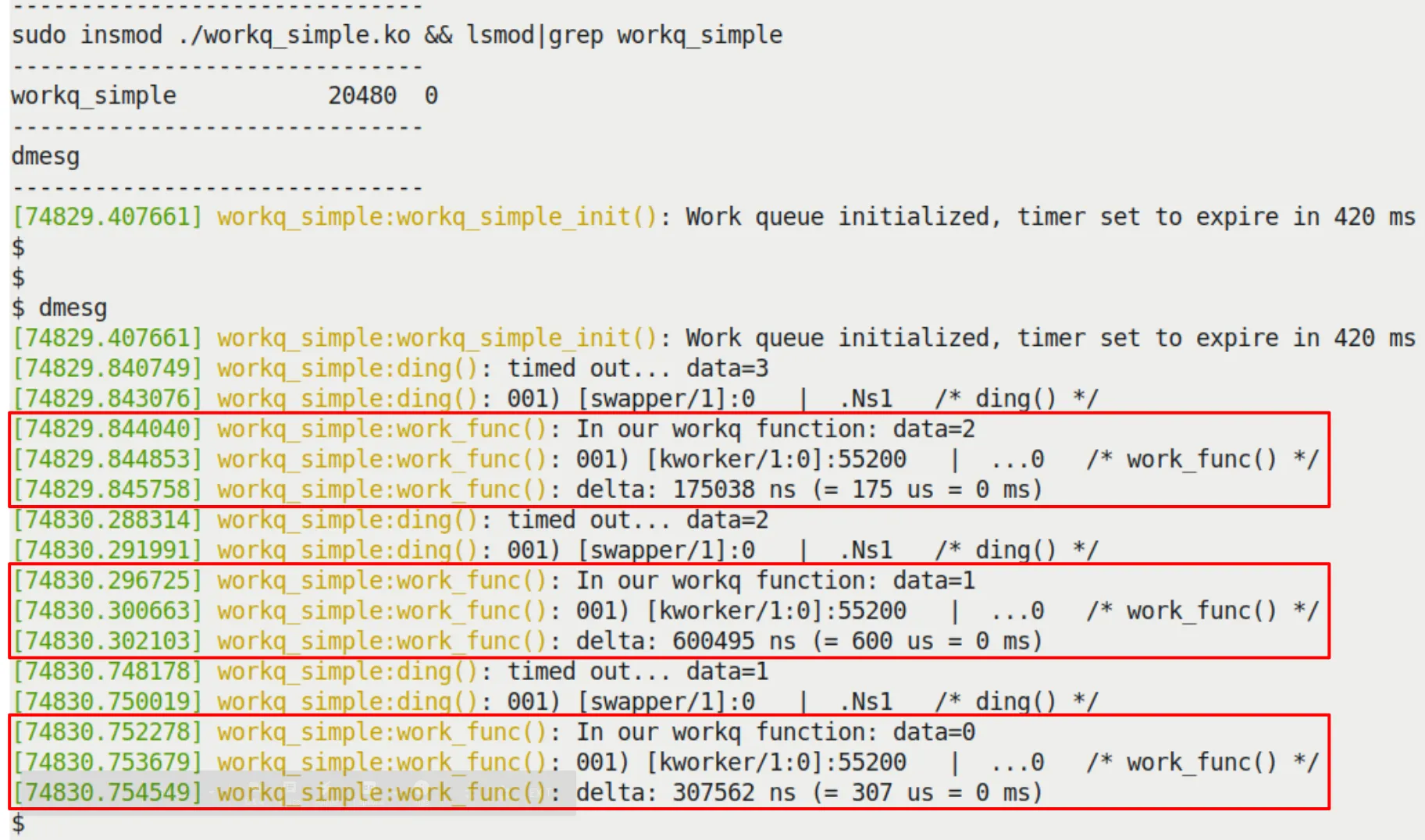 Figure 5.12 – Our workq_simple.ko LKM
The sed3 mini project – a very brief look
Finally, sed3 replaces the manual thread in sed2 with a workqueue.
You no longer need to write kthread_create(), nor do you need to worry about wake_up_process. All you need to do is:
- Define a
struct work_struct. - Call
INIT_WORK. - Call
schedule_workwhen needed.
Figure 5.13 shows the sed3 logs. You can see the work is done by the kworker thread.
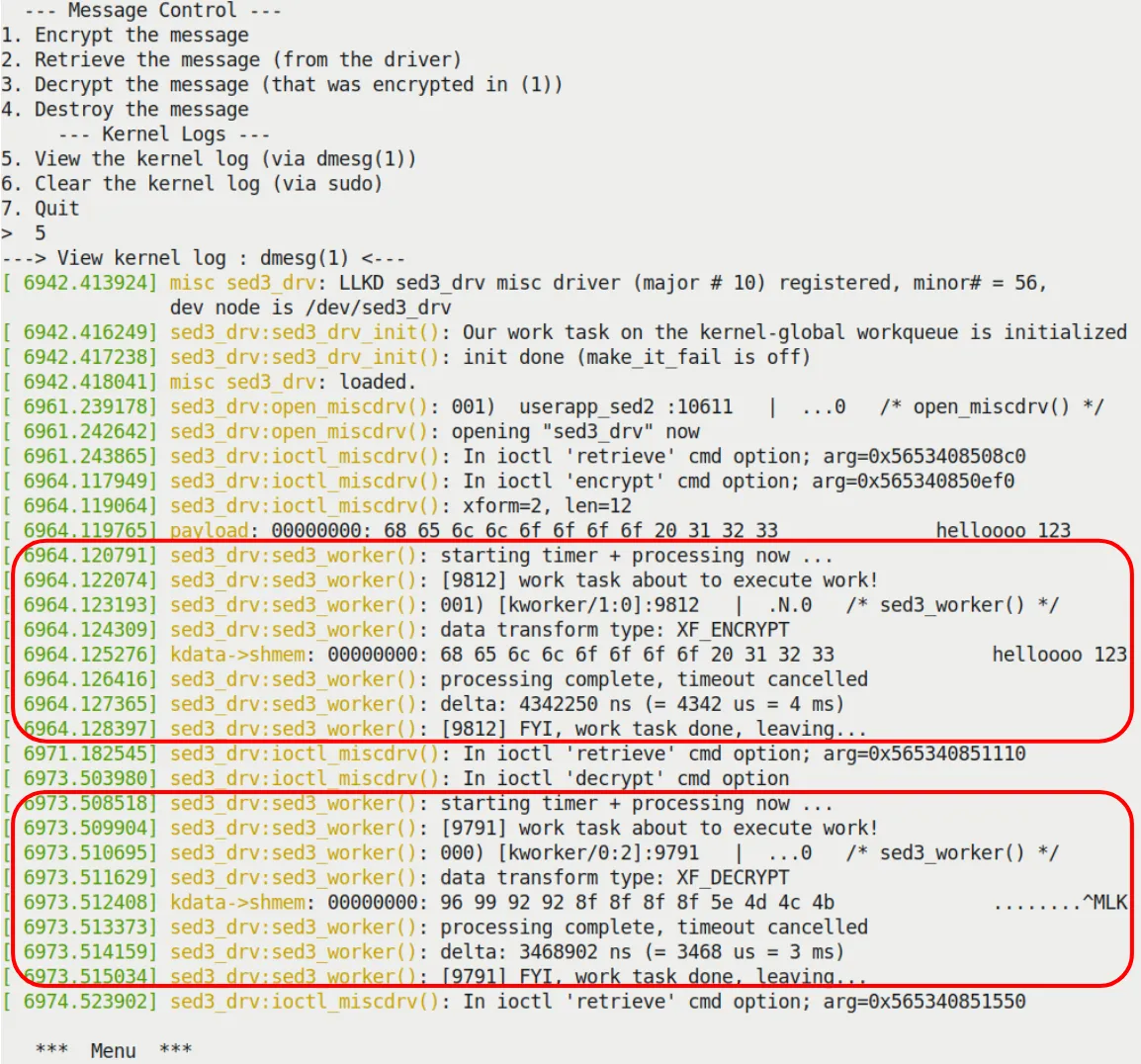 Figure 5.13 – Kernel logs when running the sed3 driver
Chapter recap
In this chapter, it felt like we were disassembling a clock, going over all the forms "time," "waiting," and "work" take in the kernel.
We covered Delay (how to busy-wait, how to sleep), Kernel Timers (how to set an alarm that goes off in atomic context), Kernel Threads (how to hire a long-term worker in the kernel), and finally Workqueues (how to leverage the kernel's ready-made thread pool for a hassle-free experience).
Remember that msleep at the beginning that crashed your system? Or the confusion about whether to "spin or sleep"? Now you should be clear: it all depends on the context you're in. In an interrupt, you can only be a "hogger"; in a process, you can be "polite." Timers are for handling urgent but brief tasks in atomic/interrupt context, while Threads and Workqueues are for deferring heavy, potentially blocking tasks to process context to be handled at a leisurely pace. Only by understanding this distinction can you navigate the kernel's concurrent world with ease.
In the next chapter, we will face the ultimate challenge brought by concurrency: what happens when two things fight over a resource at the same time? Namely—kernel synchronization. Bring your locks; we're heading into deep waters.
Exercises
Exercise 1: understanding
Question: Suppose you're writing a button device driver, and the button's Interrupt Service Routine (ISR) is responsible for debounce detection. Due to hardware limitations, you must implement the delay in interrupt context. Should you use mdelay(5) or `msleep(5)? Explain your reasoning.
Answer and analysis
Answer: You should use mdelay(5).
Analysis: The core of this question lies in distinguishing atomic context from process context. The button's ISR runs in atomic context (interrupt context).
- Context constraints: In atomic context, process scheduling cannot occur, meaning the CPU cannot be put to sleep.
- API characteristics:
mdelay()is a busy-wait; the CPU spins for the specified number of milliseconds without triggering a process schedule, so it can be safely used in interrupt context.msleep()is a blocking sleep; it essentially callsschedule()to yield the CPU, which can only be used in process context.
- Conclusion: In interrupt context, you must use the
*delay()family of APIs. Although long delays in an ISR are generally discouraged, in the mandatory scenario described by the question,mdelayis the only choice.
Exercise 2: application
Question: Kernel developers typically recommend using usleep_range(min, max) over udelay() for microsecond-level delays, especially when the delay is greater than a few tens of microseconds. Explain why this is recommended, considering the kernel's power management and scheduling mechanisms.
Answer and analysis
Answer: Because udelay() is a busy-loop that continuously occupies the CPU, whereas usleep_range() allows the CPU to enter a sleep state, saving energy.
Analysis: This is a question about API application scenarios.
CPU occupancy and power consumption:
udelay()is a BogoMIPS-based busy-loop; during the delay, the CPU continuously runs "empty instructions" at full speed, wasting CPU cycles and electrical power.usleep_range()is a sleep API based on high-resolution timers. It tells the scheduler: "don't wake me up within the [min, max] time range." This allows the kernel to put the CPU into an idle state to save power.
Scheduler optimizations:
usleep_range()accepts a range rather than a fixed value. This gives the kernel scheduler the flexibility to coalesce timer interrupts and optimize wake-up times, reducing system load.
Context applicability:
- If the code is in process context (such as a driver's read or ioctl call path) and the delay allows blocking,
usleep_range()should be the first choice to improve system efficiency. udelay()should be reserved only for atomic contexts (like interrupt handlers or spinlock-protected critical sections) or extremely short (usually < 10-20us) delays.
- If the code is in process context (such as a driver's read or ioctl call path) and the delay allows blocking,
Exercise 3: thinking
Question: When designing a driver, you may need to defer the execution of certain tasks. Compare the three mechanisms: Kernel Timer (kernel timer), Kernel Thread (kernel thread), and Workqueue (workqueue). For the requirement of "executing a data computation task that takes 50ms every 200ms," which approach is most suitable? Why?
Answer and analysis
Answer: The most suitable approach is to use a Kernel Thread.
Analysis: This is a thought exercise requiring a comprehensive analysis of context, execution time, and blocking characteristics.
Eliminating kernel timers:
- A kernel timer's callback function runs in
TIMER_SOFTIRQ(softirq/atomic context). - Atomic context constraints: Cannot sleep, cannot call potentially blocking APIs, and execution time must be as short as possible (to avoid excessive system latency).
- The task requirement is "50ms," which is an unacceptable disaster for atomic context—it would severely block the processing of other critical system interrupts. Therefore, kernel timers are only suitable for "short, non-blocking" wake-up operations, not for executing long computations.
- A kernel timer's callback function runs in
Workqueue vs. kernel thread:
- Workqueue: A workqueue does run in process context and can block. However, the default system workqueue is shared. If you execute a 50ms task on this queue, it might block other pending tasks on the same queue (and potentially affect critical system kernel threads). Unless you create a dedicated workqueue, it could impact system responsiveness.
- Kernel thread: This is an independent task entity. You can create a dedicated thread to handle this periodic task.
- Precise control: After creating the thread with
kthread_run(), you can implement a 200ms period in a loop usingmsleep()or precisehrtimer, with the remaining 150ms used for computation. - Isolation: This long computation won't affect the execution of other kernel work tasks.
- Precise control: After creating the thread with
- Conclusion: Although a workqueue could be used, considering the task has a long, deterministic execution cycle and a long duration, a kernel thread provides better independence and controllability. If it were just an occasional one-off bottom-half processing, a workqueue would be superior; but for sustained, heavy periodic background tasks, a kernel thread is the more traditional choice.
Key takeaways
The first principle of handling time delays in kernel programming is to strictly distinguish between busy-waiting and blocking sleep based on the current context: when in interrupt context or an atomic context like holding a spinlock, you must use the *delay() family of functions like udelay for busy-waiting to avoid system deadlocks, though this consumes CPU resources; in process context where scheduling is allowed, you should prefer sleep functions like msleep or usleep_range, especially usleep_range, which allows the kernel to optimize power consumption and scheduling by providing a time range, even though its actual wake-up time typically has some latency.
Kernel timers provide a mechanism for handling future tasks in softirq context—essentially setting an "alarm clock" that executes a callback function in atomic context once the time expires. This means the timer callback function cannot perform any operation that might cause blocking (such as accessing user-space memory or using kmalloc(GFP_KERNEL)), must use the from_timer macro to reverse-engineer the container structure pointer from a structure member, and must ensure that del_timer_sync is used to safely delete the timer during module unloading to prevent race conditions.
Directly creating and managing kernel threads (kthreads) is suitable for handling heavy background tasks that need to run long-term or might block; they have an independent task_struct and run in process context. By creating and starting a thread with kthread_run, and using set_current_state and schedule in conjunction with the kthread_should_stop flag inside the loop body to implement safe sleeping and exiting, this gives developers great flexibility but also brings the complex responsibility of handling concurrency and synchronization.
Workqueues are a higher-level abstraction over kernel threads; they reuse the kernel-provided worker thread pool to defer tasks to process context, avoiding the hassle of manual thread management. By initializing with INIT_WORK and calling schedule_work at the appropriate time, tasks can be executed asynchronously in process context by kworker threads. This both allows blocking operations inside the task and simplifies code maintenance, making it the recommended way to "defer" heavy work in the kernel.
The choice of mechanism depends on the task's requirements for execution context and blocking characteristics: use busy-waiting for extremely short delays in atomic context, use timers for precise short-duration point-in-time tasks, and prefer workqueues for heavy, potentially blocking tasks that don't require precise timing. Developers must constantly be vigilant about context switch limitations, understand that schedule() can only be called in process context, and use ktime_get_* to obtain high-precision timestamps to verify the actual accuracy of delays, in order to write kernel code that is both robust and efficient.